A usage meter for Claude Code that stays on screen
I run Claude Code most of the day, and the question I kept asking was the same one: how much
of my limit is left? Claude Code answers that with /usage. But typing it means interrupting
whatever the agent is doing, and I typed it often enough that it became a habit I didn’t want.
So now the numbers just sit in the corner of the screen.
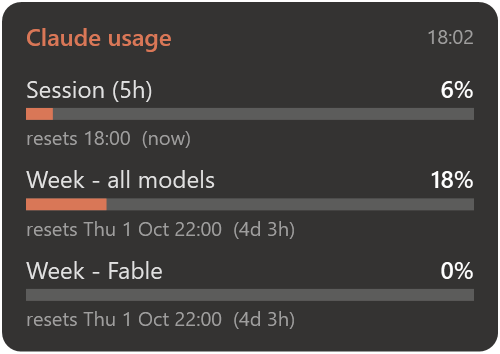
That’s the whole thing: one bar per limit (the 5-hour session, the week, and any per-model week your plan has) with the time until it resets. The bar turns amber at 60 % and red at 85 %. It sits on top of every window, you drag it wherever you like, and it starts with Windows.
It’s one PowerShell file with no install and nothing to download besides the repo: github.com/F3S0J/claude-usage-widget.
Where the numbers come from
/usage doesn’t calculate anything itself. It asks Anthropic’s servers, at
api.anthropic.com/api/oauth/usage, with the login token Claude Code already has. On Windows
that token sits in %USERPROFILE%\.claude\.credentials.json. The widget reads it and makes
the same request every two minutes, so the numbers match /usage exactly.
Two things to know before you copy this:
- That endpoint isn’t a documented public API. It’s what the official client uses, so it works, but it can change without notice. If it does, the widget will say “offline” and this post will be out of date.
- The widget only reads the token, it never refreshes it. Refreshing a login token usually hands you a new refresh token and invalidates the old one, which here would log Claude Code itself out. The trade-off: if the token expires while Claude Code is closed, the widget waits until you open Claude Code again.
F9: the terminal as a drop-down
Once the widget was running all day anyway, it could do one more job. I have a lot of windows open, and the Claude terminal is the one I keep hunting for.
- F9 brings the Claude window to the front. If it’s already in front, F9 minimizes it. If there’s no Claude window, F9 opens one.
- Shift+F9 opens another Claude session as a new tab in that same window.
So it’s one window with all your sessions as tabs, and one key to show or hide it. It’s a global hotkey registered with Windows, which has a price: while the widget runs, no other program gets F9. If you recalculate spreadsheets with F9 in Excel, change the key at the top of the script.
Three things that broke on the first day
It said “offline” while the internet was fine. The server was answering 429 Too Many Requests. The usage endpoint is rate-limited, and I had restarted the widget over and over
while building it, with each start fetching immediately. The widget treated every error the same,
so a rate limit looked like a dead connection. Now it saves every good answer to a file.
On a 429 it shows those saved numbers with their time (the corner then reads, say,
“17:54 · limited” in amber), waits longer before the next try, and goes back to normal after the next
success. The reset countdowns keep ticking from the saved data, so even stale numbers stay useful.
F9 opened sessions that left no history. I started the widget from inside a Claude Code session while building it. Child processes inherit environment variables, so every terminal the widget opened carried the marks of a sub-session, and Claude Code treated them that way. The widget now strips those variables when it starts. A general rule: anything that launches programs for you shouldn’t be started from inside the thing it launches.
PowerShell closures broke shared state. The WPF event handlers first used
.GetNewClosure(), the textbook way to capture variables. It moved the handlers into their
own scope, and $script: variables quietly pointed somewhere else. The window handle the
hotkey tracked was never the one it had saved. Plain script blocks without the closure fixed
it.
Install
git clone https://github.com/F3S0J/claude-usage-widget.git
cd claude-usage-widget
powershell -ExecutionPolicy Bypass -File .\install-shortcuts.ps1
That puts a Claude Usage shortcut on the Desktop and in the Startup folder. You need Windows 10 or 11, Claude Code logged in with a Pro or Max subscription, and Windows Terminal for the hotkey. MIT licensed. Not affiliated with Anthropic.